EzCab Minimum Acceptance & Cancellation Rating (Updated 28 May 2018)

Monday, 28 May 2018

EzCab Minimum Acceptance & Cancellation Rating
(Updated 28 May 2018)

With the recent increase of download and usage rate. We’ve noticed a substantial amount of jobs are being ignored. This will result to a longer waiting time & far away pick-up points for other drivers.

Therefore, in our continuous effort to strive to improve the experience for you, EzCab is introducing a minimum acceptance and cancellation rate to encourage more drivers to accept jobs whenever they are online. This would mean less waiting time and more of your time spent earning.

This is part of our commitment to provide the best ride-hailing experience for both passengers & drivers!

Kindly refer to the tables below for further clarification:

Acceptance Rate (AR) Conditions:
AR is an indication to allow you to monitor your overall ratings. The more jobs being accepted, the higher the AR. The more jobs being ignored or cancelled, the lower the AR, the higher the risk for a suspension.

Action will be taken once you hit certain zone level below:

** Please contact driversupport@ezcab.com.my for further instruction

Cancellation Rate (CR) Conditions:

CR will only apply if driver cancelled a job that they’ve already accepted midway.

Note: Cancellation Rate will affect the Acceptance Rate as well

How to know your Accept/Reject Rate works?

Blue Background

Example of Blue Background:

Black Background

Example of Black Background:

A friendly reminder:

  • EzCab jobs will always communicate all information you need (Destination, Fares) upfront at any AR level.
  • If you are unable to take jobs, please remember to switch to offline OR standby mode so your AR and CR will not be affected.
  • If in any case, you’ve received a street hailing job, please switch to offline OR standby mode so you will not receive jobs that will affect your AR.
  • If in case of any circumstances that you are unable go online with your EzDriver app within 3 days, your AR will not be affected. However, your AR will be affected in the future if it is more than 3 days.

Let’s work together to make it a pleasant EzCab ride experience for everyone!

Terms & Conditions :

  1. The above table takes into account every driver for all services type. Including EzCab (Fixed Fare), EzCab Budget (Meter), EzCab Executive and EzCab TOYOTA Luxury.
  2. The Rates shall be applied to all driver from all states. Including Seremban, Johor, Melaka, Klang Valley, Penang, Perak, Sabah.
  3. Any amount within the Driver’s Credit Balance & EzWallet will be forfeited once driver has been permanently banned from using the Driver App. This include NO access in cashing out the remaining balance in driver’s EzWallet or any demand to withdraw the remaining in the Credit Balance. EzCab’s decision is final and conclusive - requests for appeal and review on this case will not be entertained.
  4. EzCab reserves the sole & absolute right to forfeit Driver’s weekly incentives or future benefits at any time if any zone level is being reached and maintained below the AR by the driver.
  5. EzCab reserves the sole & absolute right to forfeit & suspend accounts of Driver who enter a specific zone level according to the rates condition.
  6. EzCab reserves the sole & absolute right to forfeit & suspend accounts of Drivers who display conduct that EzCab considers inappropriate or unacceptable (e.g.: fake bookings, etc.). EzCab’s decision is final and conclusive – requests for appeal and review will not be entertained.
  7. EzCab reserves the right to withdraw, amend and/or alter any part of the Terms & Conditions at any time without prior notice. If any dispute, EzCab reserves the final decision- request for appeal and review will not be entertained.
  8. EzCab reserves the right to fully suspend the Driver App if it deem necessary but it does not limit driver to re-apply with EzCab.

FAQ

[accordions_pickplguins id="16891"]

Commission Rate Reduced

Monday, 9 Apr 2018

Commission Rate Reduced
(valid until 7 July 2018)

Dear Driver-Partner,

Exciting news! Starting from 9 Apr 2018, the 15% commission rate will be reduced to the following for ALL EzCab App order:

  • Promo rate for Taxi: 5%
  • Promo rate for Private Vehicle: 10%

Let’s work together to make it a pleasant experience for all EzCab riders!

Note:

  1. The above reduced commission rates promo are valid until 7 July 2018.
  2. Not applicable to Call Centre assigned jobs.

An extra RM3 for EACH Alipay customers (8 Feb – 31 Mar 2018)

Thursday, 08 Feb 2018

Exclusive ALIPAY Incentive offer for EzCab Drivers only!

In collaboration between EzCab & Alipay, you can now earn an extra RM3 for every Alipay customers. This is a time limited offer (8 Feb to 31 Mar 2018), so don’t miss out this opportunity to earn more.

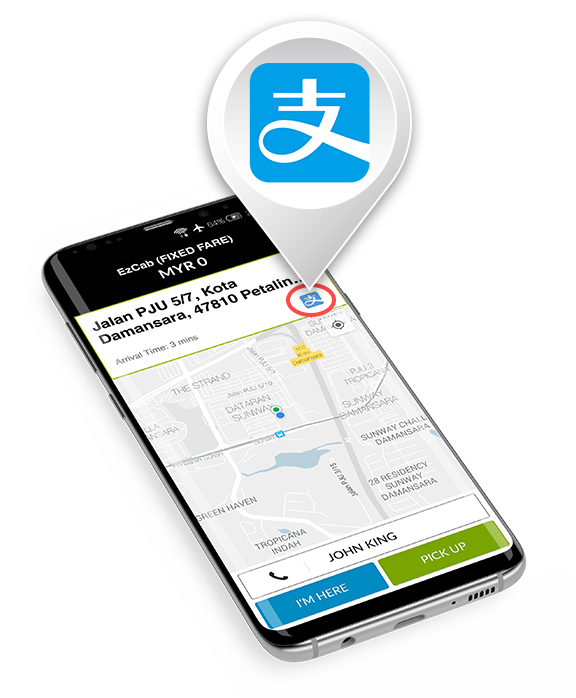
Figure 1: Example Alipay payment incoming order (circled in red below)

All Alipay payment received will be automatically added into your EzWallet ( see EzWallet guide: https://goo.gl/ufNzrN) . You can check the extra RM3 ALIPAY REWARD for the relevant transaction from the EzWallet History page.


Figure 2: Example Driver History showing the Alipay Driver incentive (circled in red below)

Terms & Conditions:

  1. This Incentive for Alipay payment transaction is valid to ALL EzCab Drivers nationwide from 8 Feb until 31 Mar 2018.
  2. The Alipay Incentive Reward is only applicable to transaction paid with Alipay payment option with total fare RM6 and above (excluding toll charges) and limited to maximum first 6(six) transactions per day.
  3. The extra RM3 Alipay Incentive Reward will be automatically added into the Driver’s EzWallet upon successful scan of customer’s Alipay QRCode.
  4. The extra RM3 Alipay Reward will be void if:
    • A cancelled booking (either by passenger or driver) nullifies the number of trips.
    • Total fare for the job is less than RM6.
    • The Alipay payment is unsuccessful and/or change of payment method upon drop-off.
    • Already exceed the maximum 6 transactions for the day.
  5. EzCab reserves the sole & absolute right to forfeit incentives & suspend accounts of Drivers who display conduct that EzCab considers inappropriate or unacceptable (e.g.: fake bookings, over charge customer, etc.). EzCab’s decision is final and conclusive – requests for appeal and review will not be entertained.
  6. The Alipay incentive RM3 reward cannot be included into EzCab Weekly Driver Incentive plan.
  7. EzCab reserves the right to withdraw, amend and/or alter any part of the Terms & Conditions at any time without prior notice. If any dispute, EzCab reserves the final decision- request for appeal and review will not be entertained.

Cash out/Top up credit:

  1. Driver may choose to use the account rebate amount accumulated in EzWallet as top up credit or cash out.
  2. Driver must ensure your EzDriver account is registered with a valid bank account number with EzCab management.
  3. Cash out request will be processed within one (1) working day (excluding Saturday, Sunday and Public Holiday) to your registered bank account.
  4. There will be no additional fund transfer charges until further notice.
  5. EzCab reserves the sole & absolute right to forfeit incentives & suspend accounts of Drivers who display conduct that EzCab considers inappropriate or unacceptable (e.g.: fake bookings, over charge customer, etc.). EzCab’s decision is final and conclusive – requests for appeal and review will not be entertained.
  6. The incentive plan is not applicable combine with previous earning trips and not able to carry forward.
  7. EzCab reserves the right to withdraw, amend and/or alter any part of the Terms & Conditions at any time without prior notice. If any dispute, EzCab reserves the final decision- request for appeal and review will not be entertained.
  8. Unless otherwise stated, incentive is only applicable to completed trips for EzCab (Fixed Fare), Budget (Meter), MPV and Executive.

Demand Heat Map – tool to help get more jobs

Friday, 15 Dec 2017

Demand Heat Map

–tool to help you get more jobs

How It Works?

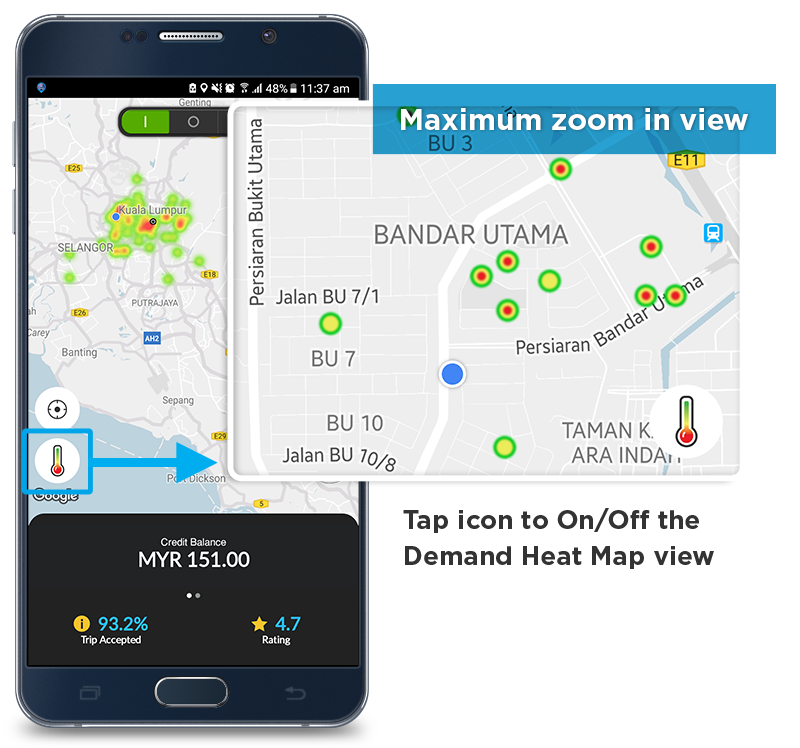
The map shows you where there are incoming Booking request:

  1. Red = Very High
  2. Yellow = High
  3. Green = Medium
  4. No colour = Low

How to use?

  • Use map to identify closest ‘High Demand’ area to where you are & heads towards there.
  • Zoom in & out on the map to identify specific ‘High Demand’ areas. At maximum zoom, you will see a dot.

How to Top Up Credit Online

Monday, 21 November 2016

How To Top Up Credit

(Online Banking)

Top up your Driver Credit via the EzDriver App

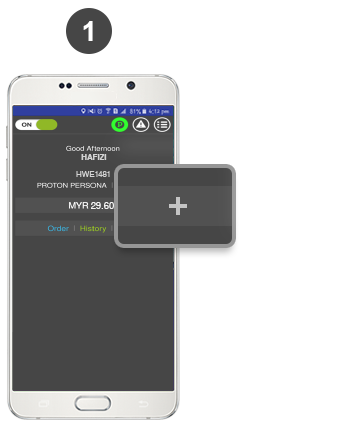
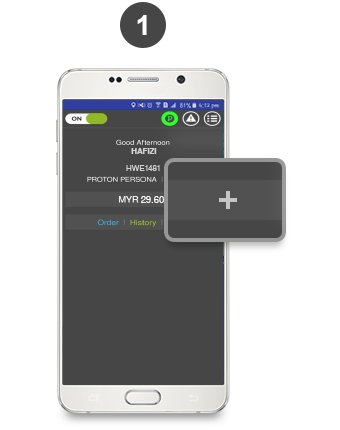
To top up, press the "+" button.

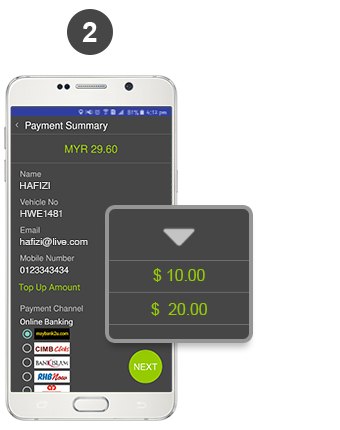
Select amount and preferred bank. Click NEXT to proceed.

*Note: Cash and credit card payment coming soon.

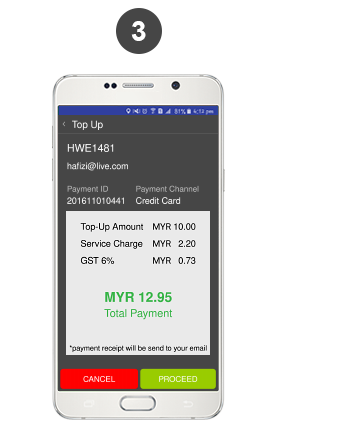
Check your payment summary, then click on PROCEED to move to MOLpay order page.

*Note: A flat-rate service charge of RM2.20 applies for every transaction.

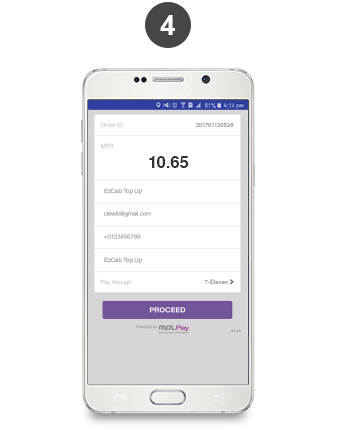
Click "Proceed" on MOLpay page to confirm your order.

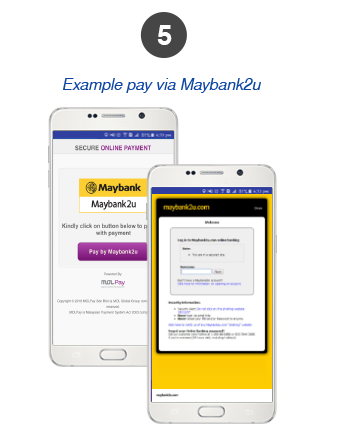
Example payment page via Maybank2U

Proceed to Maybank2U by clicking "Pay By Maybank2U" button. Proceed to complete your online transaction.

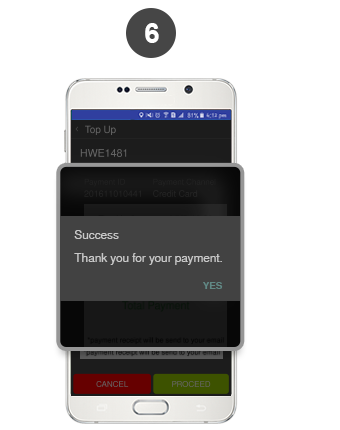
Your transaction status will be sent via a pop up notification after all the steps above are completed.

EzCab Promo Code Campaign

Last modified : 30 January 2019

EzCab Promo Code Campaign

EzCab App PROMO CODE campaign will be launched as part of the company's effort to promote the use of EzCab e-hailing app.

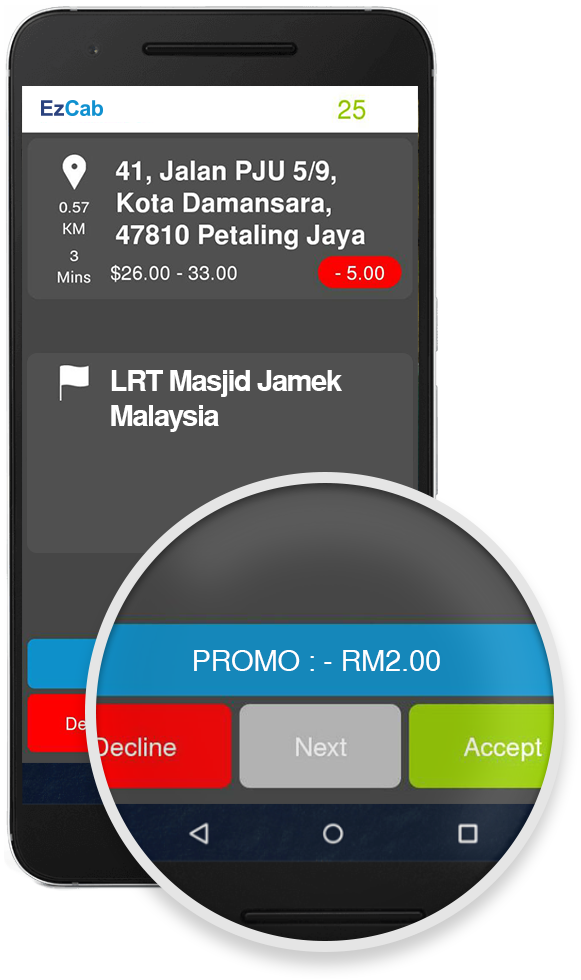
Incoming orders with Promo Code will be displayed in the BLUE box as per image shown. Kindly deduct the PROMO discount displayed from total fare. The Promo Code discounted amount will be converted into your EzWallet Balance & you may Cash Out the balance.

Click HERE  to learn how to Cash Out*.

Note: * Minimum RM20 balance for Cash Out & RM5 for Top Up from EzWallet Balance to Credit Balance.

Kindly refers to the Terms & Conditions below :

Terms & Conditions for Promo Code Discounts:

  1. Kindly deduct the PROMO discount displayed from total fare. The Promo Code discounted amount will be converted into EzWallet Balance.
  2. Promo Code value will be automatically converted to respective Driver’s EzWallet Balance.
  3. Only completed rides (upon drop-off) are considered valid.
  4. All bookings must be made via the EzCab App.
  5. Penalty will be imposed to driver who does not apply discount to Promo Code passengers.

EzCab-MyRapid Card Promo Code Campaign

Wednesday, 28 December 2016

Promo Code Campaign

EzCab-MyRapid Kad

From 1 January 2017 till 28 February 2017

We are happy to inform that EZCAB has partnered with Prasarana in MyRapid Card Privileges program. All Ezcab promotion and offer will be announced to more than 500,000 MyRapid card holders throughout Klang Valley. We hope this will encourage more users to use EzCab Taxi Booking App. All drivers kindly give your support and deduct the promo discount displayed accordingly.

The incoming order with RM2 discount will be displayed in BLUE box as per image below :

Please refers to the terms & conditions below :

Terms & Conditions

  1. RM2 discount EzRapid promo offer is valid from January 1st to 30th, 2017.
  2. Valid only for rides to/from RapidKL's LRT/ Monorial/ BRT stations.
  3. The Promo Code credit is not exchangeable for cash.
  4. Only fully completed ride (upon drop-off) will be considered valid.
  5. All bookings must be made via the Ezcab App.
  6. Driver who picks up Promo Code passenger but did not give out the discount will be penalise.
  7. Offer Valid for usage in Klang Valley only (Kuala Lumpur dan Selangor).

NOTE : Discounted value ( RM 2 ) given out for this promotion will be automatically converted to the respective driver’s credit.

New Driver Screen

Thursday, 19 January 2017

EzDriver App Update

New Driver Screen

Better user experience

The new screen will display taxi type requested by riders.
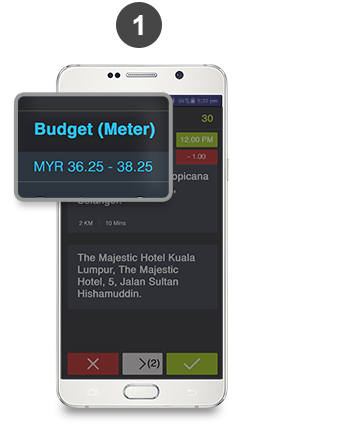
Budget Meter Taxi is blue in color.

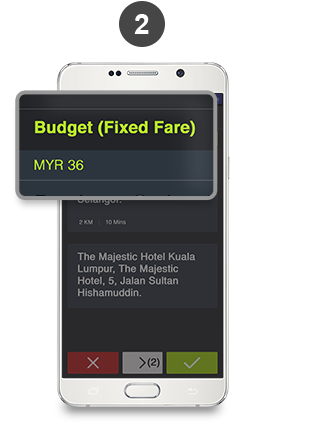
Budget Fixed Fare Taxi will appear in green color together with the amount.

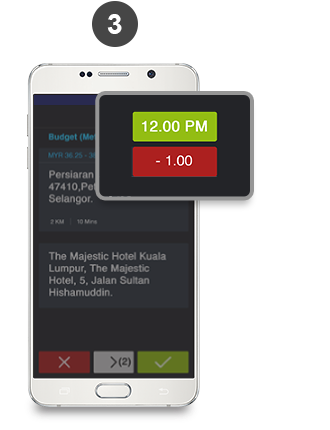
The green box displays the time for advanced booking.
The red box displays the amount payable to EzCab.
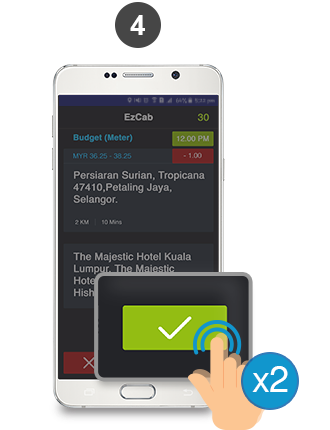
Double tap the green tick button to accept the ride.

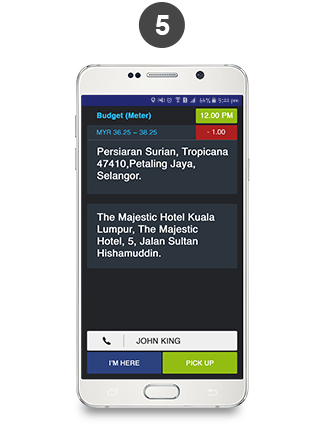
After accepting the ride, you will be shown the rider's name and option to contact the rider.

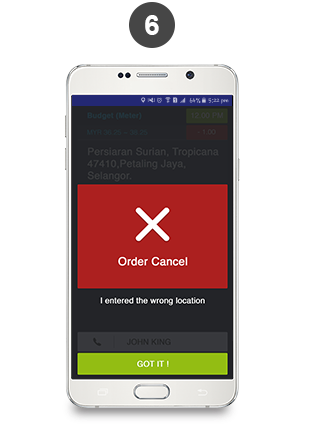
In the event of a cancellation by rider, you will be notified along with the reason.

How to Top Up Credit with MOLpay 7-Eleven

Friday, 20 January 2017

How To Top Up Credit

(CASH)

Top up your Driver Credit at any 7-Eleven

To top up, press the "+" button.

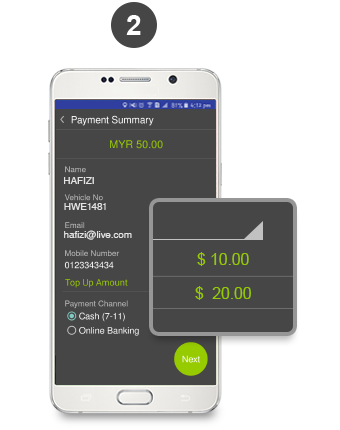
Select amount and payment method

• Cash (7-11)

*Note: Payment via Credit Card coming soon!

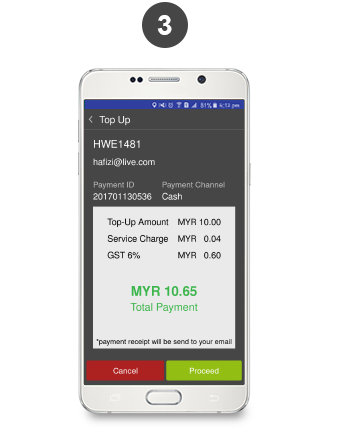
Check your payment summary, then click on PROCEED to move to MOLpay order page.

*Note: A flat-rate service charge of RM2.20 applies for every transaction.

Click "Proceed" on MOLpay page to confirm your order.

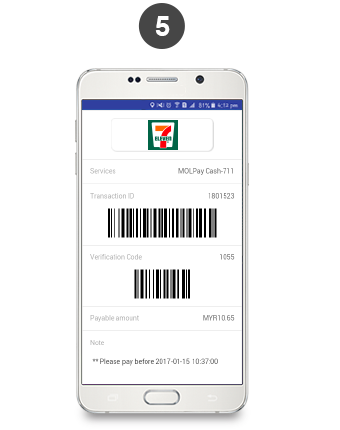
Two barcodes will be generated in your EzDriver app.

Go to any 7-Eleven nationwide.

At the cashier, mention "MOLpay" and show the barcode in your EzDriver app.

Make payment to the cashier.

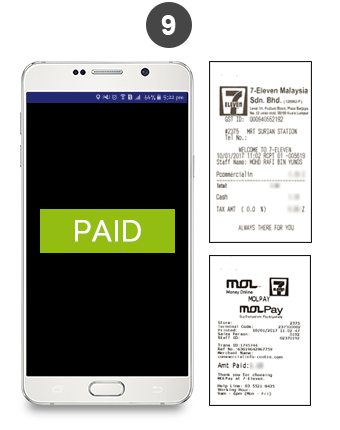
Collect receipt from cashier. Amount is now credited into your EzDriver account!